Tuesday, 15 May 2012

Evaluation Question 4, How did you use new media technologies in the construction and research, planning and evaluation stages?
In the Research and Planning stage, I came across many different technologies when looking into my band, Destinys Child, overall most of them were internet based.
 The main new media technology I used during the whole coursework would be Blogger, this was our main place where we would blog about our research into our band, all the band information would be found here.
Vimeo was also a useful source I used when uploading and sharing my videos. As you can see from the picture above Vimeo allows you to share videos on both Facebook and Twitter. This helped alot when wanting a quick and easy way to get audience feedback.

Youtube was also a very regular source myself and my group used. It's a lot faster and easier to use than Vimeo but as we can't access Youtube at school it was only a possible source when doing work from home. My Media teacher also had his own Youtube channel, this allowed us to watch other groups and our own videos in progress to the final cut. It was also easier to access comments on your videos for further audience feedback. Here is his youtube channel...
Youtube aloud us to watch videos, from home, when researching our genre we were able to watch previous music videos, from Destinys Child or other girl bands such as TLC , helping us look closely at the common conventions needed when making a girl band music video, rather than just seeing it in writing form, from websites such as Wikipedia. Also Youtube has pages for certain artists, with a list and links to their videos, only making it easier when trying to find videos for Destinys Child. Also Youtube allows you to see videos from people across the world so this shows a variety of cultural footprints, with whose talking about Destinys Child, or singing one of there songs. I've found that when looking at the cultural footprints, I saw a lot of teens both male and female between our target audience age range, 15-24. This gave myself and my group a better focus on what fans like about Destinys Child.

We have previously used iMovie for our AS projects, so we were fairly familiar with how iMovie worked. This helped us progress and experiment with different and new tools we may not of used in the past. However it was our first year with Final Cut, and we had the chance to book tutorials with John Cockshaw, due to the fact that we weren't as confident with this program. Final Cut Express produces a better quality product, so this is why iMovie is only used temporarily with our product.
Final Cut allows you to add more effects and transitions between clips, compared to iMovie and in Final Cut it also allows you to extract audio from clips, so when editing the audio can be taken away so anything you do not want in you can take out of the background noise of the shot. Final cut allowed us to put in layering effects and decrease and increases something called the opacity, which we used a lot in our music video, with our main theme being flashbacks.
Also when doing a Pod Cast, and say if the voice recorder is in use, then we will be able to use a video camera, which would then mean we had to extract the audio, in order for it to be a podcast.
Here is a Vodcast we extracted audio from, but we used this as behind the scenes footage instead:
 Also another website which was great to use when uploading Podcast's was Divshare. Its quick, simple and easy to use. Here is a Podcast using Divshare.
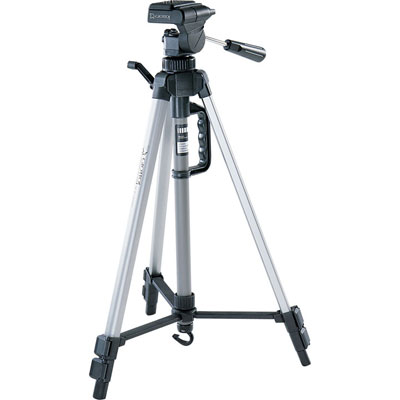
When we had to actually film the footage we used a HD camera, which were new to A2 from AS. This camera gave us a better quality of footage, compared to what we would of got from using the camera from last year, which was not a HD one.Using a camera that was high quality, this helped to make our music video look a lot more professional, as if it were a real one. Something that was a very useful and vital piece of equipment that helped us for both AS and A2 was a tripod.This was to make sure our shots were steady, so we didn't run the risk of having a shaky camera which could jeopardise our shots.
 Photoshop was a program that we used when making our Digipak and Mag Ad. It allowed us to edit our images, and change the colour easily, meaning we could change our front and back panel images to any colour or scale we wanted. Playing around with the effects helped us see what was best for both our Digipak and Mag Ad.


 The main new media technology I used during the whole coursework would be Blogger, this was our main place where we would blog about our research into our band, all the band information would be found here.
In order to record all our research and planning I created a blog. A blog is an online portfolio, which you can access both at home and at school, this allowed us to present all stages of our coursework, updating it on a daily or weekly basis. With blogger we also created a production blog for our production company Blazing Grace Productions we came up with the company name due to the constrast in 'blazing' and 'grace', feeling it was rememorable and made an impact.
 The production blog was mostly focused around the production of our music video, so it mainly included a filming schedule and updates on casting and shoots, we feel it should of been updated on a more frequent basis but all our rough cuts are up giving people a chance to watch our video in the process to its final cut. Blogger is also easily accessible, and can be found by certain Google searches, therefore widening the audience of who will view your blog, allowing you to gain more audience feedback. Blogger is also a good and quick way for our media teacher to access a look at our work so far without, as he created a blog aswell, meaning we can simply ask any questions if needs without being at school, as well as accessing gmail which I recieved emails about the progress from my media teacher and comments that were awaiting to be moderated. Also working with Asa Newmarch and Sophie Dixon, it meant I could keep up to date with work they were updating on there blog as part of our Research and Planning as we often split the research, helping us to see if we can add to a post or they can add to mine, this saved us a lot of time, we titled the post with each others initials meaning we could share the posts.
Another way Blogger is useful, is that you can in put hyper links which is always useful when trying to show in a post maybe where you gained your information, a hyper link is a direct link which you can place in your post, and it will take you or the person looking at that certain blog, straight to the source, or in some cases to a youtube page to show a video, if some videos will not embed. I used hyper links when speaking about Destinys Child, and linked the post to websites from their record co. and the history of Destinys Child.
 The production blog was mostly focused around the production of our music video, so it mainly included a filming schedule and updates on casting and shoots, we feel it should of been updated on a more frequent basis but all our rough cuts are up giving people a chance to watch our video in the process to its final cut. Blogger is also easily accessible, and can be found by certain Google searches, therefore widening the audience of who will view your blog, allowing you to gain more audience feedback. Blogger is also a good and quick way for our media teacher to access a look at our work so far without, as he created a blog aswell, meaning we can simply ask any questions if needs without being at school, as well as accessing gmail which I recieved emails about the progress from my media teacher and comments that were awaiting to be moderated. Also working with Asa Newmarch and Sophie Dixon, it meant I could keep up to date with work they were updating on there blog as part of our Research and Planning as we often split the research, helping us to see if we can add to a post or they can add to mine, this saved us a lot of time, we titled the post with each others initials meaning we could share the posts.
Blogger also enable you to embed videos from sites such as YouTube and Vimeo so people can then view videos via your blog, meaning we can place rough cuts of our music video on our blog, and again with the fact people can view this and just write a comment makes it a very simple and quick way to gain audience feedback.
I have embedded many videos from Vimeo, such as a vodcast we uploaded, speaking about the updates within Blazing Grace, http://a2vid2012-katiem.blogspot.co.uk/2012/02/all-blazing-grace-update-so-far.html, before our course started I had already started using uploading videos from Vimeo and Youtube such as here, http://a2vid2012-katiem.blogspot.co.uk/2011/09/music-video-deconstruction-4-noah-and.html.
This is what it should look like when embedding a code to begin with:
 |
| Screenshot of process when embedding a code. |
 |
| Hyper links. |
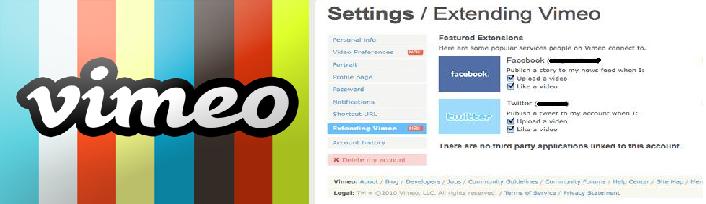 |
| You can share videos to Facebook & Twitter via Vimeo. |
Vimeo was also a useful source I used when uploading and sharing my videos. As you can see from the picture above Vimeo allows you to share videos on both Facebook and Twitter. This helped alot when wanting a quick and easy way to get audience feedback.

Youtube was also a very regular source myself and my group used. It's a lot faster and easier to use than Vimeo but as we can't access Youtube at school it was only a possible source when doing work from home. My Media teacher also had his own Youtube channel, this allowed us to watch other groups and our own videos in progress to the final cut. It was also easier to access comments on your videos for further audience feedback. Here is his youtube channel...
Youtube aloud us to watch videos, from home, when researching our genre we were able to watch previous music videos, from Destinys Child or other girl bands such as TLC , helping us look closely at the common conventions needed when making a girl band music video, rather than just seeing it in writing form, from websites such as Wikipedia. Also Youtube has pages for certain artists, with a list and links to their videos, only making it easier when trying to find videos for Destinys Child. Also Youtube allows you to see videos from people across the world so this shows a variety of cultural footprints, with whose talking about Destinys Child, or singing one of there songs. I've found that when looking at the cultural footprints, I saw a lot of teens both male and female between our target audience age range, 15-24. This gave myself and my group a better focus on what fans like about Destinys Child.

Scribd is also another site I used, this is a social publishing site, where you can share word documents and writings. Scribd was always useful, for when we wanted to upload writing documents, for example call sheets, story boards, and our treatment. We could not just straight away put them on do blogger with them being word documents, so we had to scan them using the scanner provided by media, and then upload them onto Scribd and then like we do with Youtube and Vimeo we then copy and pasted the embedded code into Blogger.
In order to upload our footage onto final cut we first of all had to import in onto iMovie, and then export the clips to Final Cut. These were the main two programmes used in the editing process for our music video.

Final Cut allows you to add more effects and transitions between clips, compared to iMovie and in Final Cut it also allows you to extract audio from clips, so when editing the audio can be taken away so anything you do not want in you can take out of the background noise of the shot. Final cut allowed us to put in layering effects and decrease and increases something called the opacity, which we used a lot in our music video, with our main theme being flashbacks.
Also when doing a Pod Cast, and say if the voice recorder is in use, then we will be able to use a video camera, which would then mean we had to extract the audio, in order for it to be a podcast.
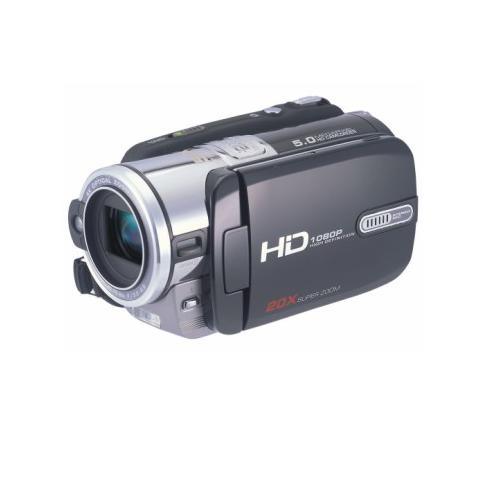 |
| HD Cam we used for Podcasts&Vodcasts and to film our final video. |
Also another website which was great to use when uploading Podcast's was Divshare. Its quick, simple and easy to use. Here is a Podcast using Divshare.When we had to actually film the footage we used a HD camera, which were new to A2 from AS. This camera gave us a better quality of footage, compared to what we would of got from using the camera from last year, which was not a HD one.Using a camera that was high quality, this helped to make our music video look a lot more professional, as if it were a real one. Something that was a very useful and vital piece of equipment that helped us for both AS and A2 was a tripod.This was to make sure our shots were steady, so we didn't run the risk of having a shaky camera which could jeopardise our shots.
Photoshop was a program that we used when making our Digipak and Mag Ad. It allowed us to edit our images, and change the colour easily, meaning we could change our front and back panel images to any colour or scale we wanted. Playing around with the effects helped us see what was best for both our Digipak and Mag Ad.
Here is our first draft for the Digipak. It looked way to cheap to be considered as a real one so we used different effects and came up with our final front panel:
We have not necessarily used effects but something else that Photoshop allows you to do it add text onto a picture which is what we decided to do.
Our Mag Ad on the other hand was used to experiment with Photoshop.
Here was our first draft. We felt that including a split screen effect at the side would help us to easily relate to the video as we include a split screen there, but instead we decided for a more simple but classy Mad Ag:
We kept the band members in colour whilst changing the background into a grey scale(black and white). we also used multi-layering in the top left hand corner, so this helped to include the music video in a more professional way.
Tuesday, 8 May 2012
AN - Audience Feedback on Digipak
Today we managed to obtain feedback from our class colleagues on the second version of our digipak.
No information on the DVD.
Email address isn't needed.
No upper case in the web address.
The QR code needs to work, in order to show ICT skills. Linked to company blog.
The sticker on the front cover was way too big.
Huge line spacing can be seen on the sticker.
Copyright information needs to be smaller.
The main title on the front needs to be centred.
Use plain Sariff font if needed.

Inner panel 1
We decided to abandon the inner digipak design with the pictures of the wine bottles because my colleagues didn't understand the deeper meaning behind them.

Inner panel 2

Inner panel 3
.jpg)
Hidden credits panel
Panel behind the front cover
These next images are the panels which have been improved:
Front cover

Back panel
Now the QR code leads to the Blazing Grace production blog.
SpineOverall from this feedback while the outer panels are fine, the inside panels need changing. So now I will allow Sophie to make the inside of the digipak and I will take over making the magazine in order to speed things up in terms of scheduling.
No information on the DVD.
Email address isn't needed.
No upper case in the web address.
The QR code needs to work, in order to show ICT skills. Linked to company blog.
The sticker on the front cover was way too big.
Huge line spacing can be seen on the sticker.
Copyright information needs to be smaller.
The main title on the front needs to be centred.
Use plain Sariff font if needed.

Inner panel 1
We decided to abandon the inner digipak design with the pictures of the wine bottles because my colleagues didn't understand the deeper meaning behind them.

Inner panel 2

Inner panel 3
.jpg)
Hidden credits panel

Panel behind the front cover
These next images are the panels which have been improved:

Front cover

Back panel
Now the QR code leads to the Blazing Grace production blog.

SpineOverall from this feedback while the outer panels are fine, the inside panels need changing. So now I will allow Sophie to make the inside of the digipak and I will take over making the magazine in order to speed things up in terms of scheduling.
ALL - Mag AD, Draft
After many delays and issues, we finally managed to finish the magazine advert thanks to Miss Sophie Dixon, with some Photoshop advice from me of course. Anyway deconstructing the advert, it is made up of four pictures of the band. The band's clothing denotes the male gaze theory where the audience is shown that women are treated nothing more than seductive objects for male desire.

Here is an example shown to promote the 360/PS3 title,
Ninja Gaiden 3 which comes out next week. Yey!
Pink text is used at the top left hand corner of the advert, to attract a female audience towards the digipak since it is the prime colour associated with women. Twitter and Facebook links to the company/band pages can be seen at the bottom left hand corner of the page. This is a common convention seen across different media products from music videos to even video games.
As for what the advert is advertising, it is promoting the upcoming release of the digipak as shown by the release date in silver. Little text is shown to give the advert a mysterious feel with the only piece of information being a date of 15th March.
Here is an example shown to promote the 360/PS3 title,
Ninja Gaiden 3 which comes out next week. Yey!
Pink text is used at the top left hand corner of the advert, to attract a female audience towards the digipak since it is the prime colour associated with women. Twitter and Facebook links to the company/band pages can be seen at the bottom left hand corner of the page. This is a common convention seen across different media products from music videos to even video games.
As for what the advert is advertising, it is promoting the upcoming release of the digipak as shown by the release date in silver. Little text is shown to give the advert a mysterious feel with the only piece of information being a date of 15th March.

ALL, Digipak, Draft
Here is the final version of my digipak. As shown below, there are 3 main panels which can be folded out.
On the front cover we have a ripped picture of the band which links in with the break up theme of the video
Then on the inside we have three panels of the band member's faces shown on a bottle of wine with two glasses. On the first panel they're empty, second they're full and third, one glass has a tiny bit of wine next and the other glass is smashed.
When you fold out the first panel, a "saucy" picture of the band is seen. This links in with the male gaze theory because of the artists' clothing. Leading to male target audience.
If you fold the middle inside panel, the credits of the digipak can be seen. Which includes, the roles of the group and links to the company's Twitter and Facebook pages
The discs come out of two disc sleeves which are part of the two panels on the sides of the middle one.
Lastly on the back of the digipak we have the track and extras listing. Besides that, we also have a link to the main website, bar and QR codes along with a picture of band members walking away.

On the front cover we have a ripped picture of the band which links in with the break up theme of the video
Then on the inside we have three panels of the band member's faces shown on a bottle of wine with two glasses. On the first panel they're empty, second they're full and third, one glass has a tiny bit of wine next and the other glass is smashed.
When you fold out the first panel, a "saucy" picture of the band is seen. This links in with the male gaze theory because of the artists' clothing. Leading to male target audience.
If you fold the middle inside panel, the credits of the digipak can be seen. Which includes, the roles of the group and links to the company's Twitter and Facebook pages
The discs come out of two disc sleeves which are part of the two panels on the sides of the middle one.
Lastly on the back of the digipak we have the track and extras listing. Besides that, we also have a link to the main website, bar and QR codes along with a picture of band members walking away.

Tuesday, 1 May 2012
Podcast 5 - Asa speaking about Audience feedback and more
In this podcast, I go solo by talking about the feedback from some friends of mine. I go into detail on topics such as long chunks of narrative and the use of Sepia.
AN - Rough cut 2 feedback
Today in class, we managed to obtain some feedback on our second rough cut. Although a new cut is in the works, this feedback was still useful. Here is what our colleagues said:
Performers need to vocalise.
Sepia is good.
Generate a still image at the beginning.
Cross faded
More performance sequences needed.
More dance moves need to be seen.
Shaky shots in some places
Cut down on the amount of narrative.
More slow-motion needs to be used in certain places.
Get a fixed shot of the rose.
Edit the video so it fits in with the beat and pacing of the track.
More variation in footage.
Split screen technique needs to be used.
Clumsy use of media language. e.g. shot of member's leg.
Layer clips
Cut to beat at points
Aspect ratio needs changing.
Change the band member's positioning around at points in the video.
Performers need to vocalise.
Sepia is good.
Generate a still image at the beginning.
Cross faded
More performance sequences needed.
More dance moves need to be seen.
Shaky shots in some places
Cut down on the amount of narrative.
More slow-motion needs to be used in certain places.
Get a fixed shot of the rose.
Edit the video so it fits in with the beat and pacing of the track.
More variation in footage.
Split screen technique needs to be used.
Clumsy use of media language. e.g. shot of member's leg.
Layer clips
Cut to beat at points
Aspect ratio needs changing.
Change the band member's positioning around at points in the video.
AN - First rough cut of Mag Ad
After many delays and issues, we finally managed to finish the magazine advert thanks to Miss Sophie Dixon, with some Photoshop advice from me of course. Anyway deconstructing the advert, it is made up of four pictures of the band. The band's clothing denotes the male gaze theory where the audience is shown that women are treated nothing more than seductive objects for male desire.
Here is an example shown to promote the 360/PS3 title,
Ninja Gaiden 3 which comes out next week. Yey!
Pink text is used at the top left hand corner of the advert, to attract a female audience towards the digipak since it is the prime colour associated with women. Twitter and Facebook links to the company/band pages can be seen at the bottom left hand corner of the page. This is a common convention seen across different media products from music videos to even video games.
As for what the advert is advertising, it is promoting the upcoming release of the digipak as shown by the release date in silver. Little text is shown to give the advert a mysterious feel with the only piece of information being a date of 15th March.
Here is an example shown to promote the 360/PS3 title,
Ninja Gaiden 3 which comes out next week. Yey!
Pink text is used at the top left hand corner of the advert, to attract a female audience towards the digipak since it is the prime colour associated with women. Twitter and Facebook links to the company/band pages can be seen at the bottom left hand corner of the page. This is a common convention seen across different media products from music videos to even video games.
As for what the advert is advertising, it is promoting the upcoming release of the digipak as shown by the release date in silver. Little text is shown to give the advert a mysterious feel with the only piece of information being a date of 15th March.
AN - First rough cut of Digipak
Here is the final version of my digipak. As shown below, there are 3 main panels which can be folded out.
On the front cover we have a ripped picture of the band which links in with the break up theme of the video
Then on the inside we have three panels of the band member's faces shown on a bottle of wine with two glasses. On the first panel they're empty, second they're full and third, one glass has a tiny bit of wine next and the other glass is smashed.
When you fold out the first panel, a "saucy" picture of the band is seen. This links in with the male gaze theory because of the artists' clothing. Leading to male target audience.
If you fold the middle inside panel, the credits of the digipak can be seen. Which includes, the roles of the group and links to the company's Twitter and Facebook pages
The discs come out of two disc sleeves which are part of the two panels on the sides of the middle one.
Lastly on the back of the digipak we have the track and extras listing. Besides that, we also have a link to the main website, bar and QR codes along with a picture of band members walking away.
On the front cover we have a ripped picture of the band which links in with the break up theme of the video
Then on the inside we have three panels of the band member's faces shown on a bottle of wine with two glasses. On the first panel they're empty, second they're full and third, one glass has a tiny bit of wine next and the other glass is smashed.
When you fold out the first panel, a "saucy" picture of the band is seen. This links in with the male gaze theory because of the artists' clothing. Leading to male target audience.
If you fold the middle inside panel, the credits of the digipak can be seen. Which includes, the roles of the group and links to the company's Twitter and Facebook pages
The discs come out of two disc sleeves which are part of the two panels on the sides of the middle one.
Lastly on the back of the digipak we have the track and extras listing. Besides that, we also have a link to the main website, bar and QR codes along with a picture of band members walking away.
Tuesday, 17 April 2012
Anti - Who should the PCC work for?
The PCC describe what it does well...but not who it does it for?
Hmm... well Abbey Clancy, partner to Peter Crouch, had a recent case involving the PCC. They promised to keep her pregnancy quiet until after 12 weeks, then it would be publicly published. They choose to quote that they work 'behind the scenes' to protect peoples privacy, this is particularly edging towards public figures and celebs, involving Abbey Clancy's pregnancy.
But it seems they like to contribute and offer background assistance to people in the eye of the 'press storm'. Such as Vanessa Perroncel, the woman at the centre of John Terry's story. Both of these stories caused great criticism, such as Peter Crouch for criticising 'The Sun' for breaking the news story about his partner, and Ms. Perroncel gave an interview to 'The Guardian'.
Apart from this celebs benefit from the silence of the PCC, or at least...are not harmed from it.
Hmm... well Abbey Clancy, partner to Peter Crouch, had a recent case involving the PCC. They promised to keep her pregnancy quiet until after 12 weeks, then it would be publicly published. They choose to quote that they work 'behind the scenes' to protect peoples privacy, this is particularly edging towards public figures and celebs, involving Abbey Clancy's pregnancy.
But it seems they like to contribute and offer background assistance to people in the eye of the 'press storm'. Such as Vanessa Perroncel, the woman at the centre of John Terry's story. Both of these stories caused great criticism, such as Peter Crouch for criticising 'The Sun' for breaking the news story about his partner, and Ms. Perroncel gave an interview to 'The Guardian'.
Apart from this celebs benefit from the silence of the PCC, or at least...are not harmed from it.
Subscribe to:
Posts (Atom)